



 Watch video








 Sign in with Google
Monetization
6 Ways to Generate 4,000 Hours of YouTube Watch Time Faster (Proven Watch Time Growth Tips)


If you want to monetize your content, reaching 4,000 hours of YouTube watch time is essential. In this guide, you’ll learn actionable YouTube watch time tips that help you grow faster, improve retention, and understand exactly how to get 4,000 watch hours on YouTube using smart strategies and TubeBuddy tools.
We covered subscriber growth in-depth in a separate post, but for now, let’s focus on watch time and the importance of building it through your content.
4,000 hours watch time = 240,000 minutes.
That’s a lot of minutes, but we’re going to give you some solid advice on how to get your videos watched by more people and get you to that goal faster. We’ll also let you know which TubeBuddy tools will help you.
Need a visual tutorial? Watch our video to make sure you’re doing everything correctly when it comes to watch time:
#1 Video Length and YouTube Watch Time
You may think that the longer your video, the higher the watch time hours.
That’s just not true. It may even backfire if your analytics are reporting that viewers are dropping out before the end of the video. YouTube is looking at those metrics, and the more viewers who abandon your content, the less likely YouTube is to serve it up to more people on the platform.
It may be a much more successful strategy to create shorter videos that people watch longer than making a long video where people click out only 20% of the way through.
Use data-backed suggestions on ideal video length, retention insights, and short-long format balance.
How long do your videos need to be? The answer is as long as they need to be to get the point across. Being able to condense and package up your videos in the shortest amount of time possible will significantly benefit you.

Get an unfair advantage on YouTube
Give your YouTube channel the upper hand and easily optimize for more views, more subs, and more of every metric that matters.
#2 What’s the Deal With YouTube Shorts and Watch Time?
If we’re suggesting that you make your videos as concise as possible, should you be creating Shorts content instead of longer-form videos? Not necessarily.
Any subscribers you gain from your Shorts will count towards your goal of reaching 500 (the other metric you need to qualify to join the YouTube Partner Program and become eligible for monetization).
BUT the YouTube Shorts watch time generated by YouTube Shorts, especially if they’re served to viewers via the Shorts shelf, will not count towards your 4,000 hours needed. So keep creating Shorts if that’s the kind of content you love to do, but remember that you’ll need to reach 3M Shorts views in 90 days to check that box in the YouTube Partner Program requirements, and understand how to grow YouTube watch time fast using A/B Testing and SEO Studio to meet monetization goals
#3 Audience Retention Metrics are Your Friend
If you have been publishing videos to your channel, you’ll have some performance data to work with, giving you feedback on how your content resonates with viewers and how your YouTube audience retention impacts your ability to increase YouTube watch time.
There are several tools that both YouTube and TubeBuddy have that can help you with things like audience retention, drop-off rate, and even complementary Click-through Rate tools to optimize performance.
On YouTube, you can access your YouTube audience retention analytics via YouTube Studio. Just click on a published video and click ‘Analytics.’ From the new dashboard, click on ‘Engagement’ to access the data you need. Look out for ‘Typical Audience Retention’ and ‘Key Moments for Audience Retention‘ metrics. We’ll be taking a deeper dive into these reports in a future post.
If you have a TubeBuddy Legend or Enterprise account, you have access to our ‘Retention Analyzer’ report, which will tell you how many people are still watching your video at various time intervals, e.g., 30 seconds or 60 seconds in, helping you increase YouTube watch time strategically.

If you see a dramatic cutoff in retention, you should address that in your content strategy. Think about the types of videos you’re making or how long the videos are. Keep a very close eye on audience retention after you’ve published a video to see where improvements can be made.
#4 Publish Your Videos When Your Audience is Online
When you publish a video, you want to ensure that as many viewers see it as possible. One metric that will be invaluable for you is knowing the best time to publish on YouTube, including when your viewers are online and where most of your viewers are watching, since timing directly impacts your ability to increase YouTube watch time.
For instance, if you’re based in the United States, but most of your viewers are based in Japan, you should publish in Japan Standard Time to leverage those potential viewers and subscribers.
If you want to know when the best time to publish is, TubeBuddy has a tool that can help you with this exact metric, and it’s available to anyone with a license.
If you want to know the best time to publish on YouTube, TubeBuddy has a feature called the Best Time to Publish Tool that can help you with this exact metric, and it’s available to anyone with a license.
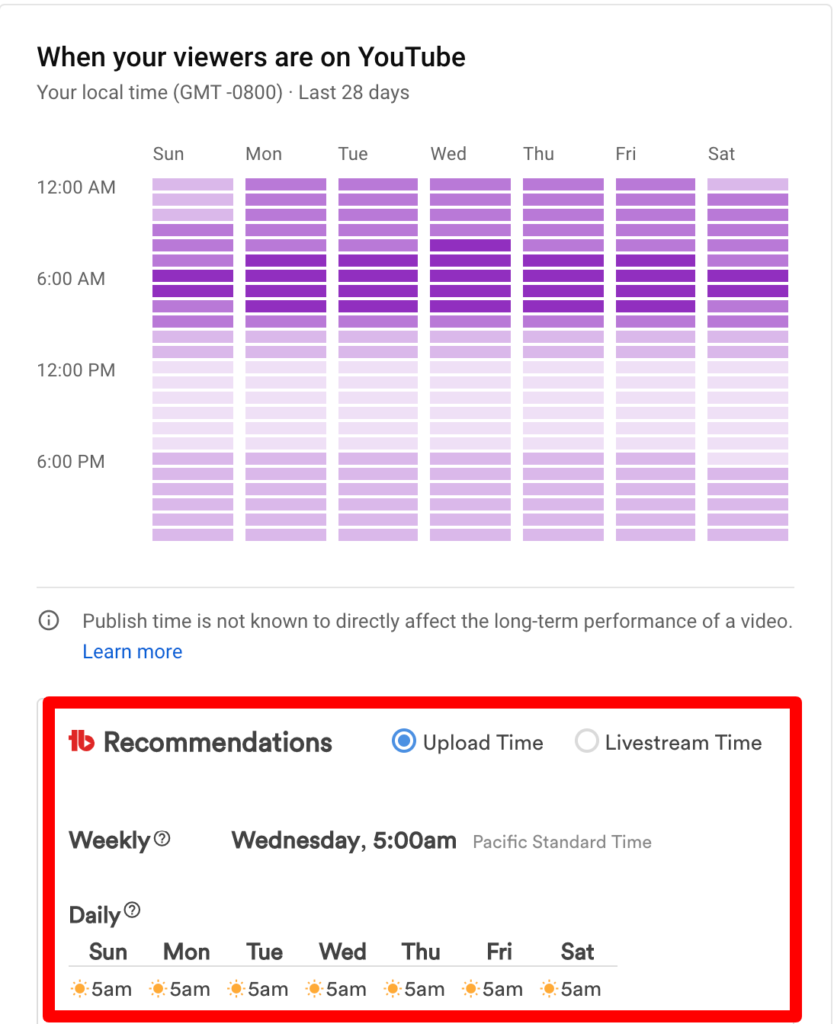
Go to your YouTube Studio and open the TubeBuddy icon at the top right, then scroll down to ‘Extension Tools’ and click on ‘Best Time To Publish.’ You’ll be redirected to the ‘Audience’ tab of YouTube Studio Analytics. On this dashboard, scroll down to the ‘When your viewers are on YouTube’ section.
Just below YouTube’s graph, you can see recommendations from TubeBuddy about when to publish your next video. It even tells you the best time to live stream, helping you strategically increase YouTube watch time.
Why is publishing time so important? The first 24 hours after you’ve published a video are the most crucial for a creator. If a new video gets some good traction with initial views, engagements, and watch time, this sends a strong signal to YouTube that your video is performing well. This may lead to it being promoted to new viewers.
#5 Make the Most of End Screens, Info Cards, and Playlists
Info cards and end screens are two fantastic YouTube features that allow you to link to other videos (and much more). This can give your viewers more context on a topic you’re discussing or enable you to promote more of your content. These YouTube watch time tips are simple but powerful ways to increase YouTube watch time, so if you’re not taking advantage of either of these extras, make a start today.
While many creators use end screens and info cards to send people to a specific video, did you know that you can also add a playlist as a link? Why not create a playlist of the videos that have gained you the most subscribers to leverage that content. Tools like the Playlist Planner Tool and Thumbnail Analyzer can further optimize how viewers move through your content and stay engaged.
This is an important strategy for generating extra watch time for your channel. YouTube rewards video content that keeps viewers on the platform for as long as possible. In addition, guiding viewers to a curated and relevant playlist will help you increase YouTube watch time effectively.
#6 Use Comments to Drive Engagement
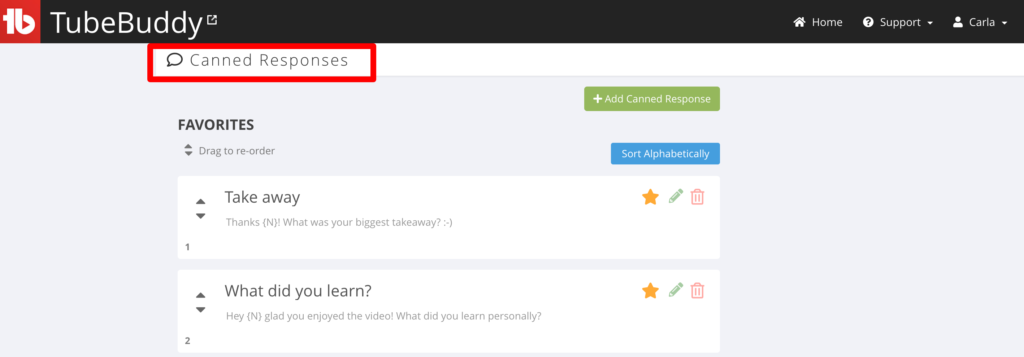
When it comes to comments on your YouTube videos, it always pays to respond in a timely manner, especially in the first few hours after publishing. These simple YouTube watch time tips can make a measurable difference. So why not create a canned response comment that includes a link to your most popular video or a playlist of videos on a similar topic to drive engagement and more watch time and views, especially if you’re focused on how to grow YouTube watch time fast?
You can also create canned responses with open-ended questions to generate more conversation. Such as:
- What was your biggest takeaway from the video?
- Did you learn anything new?
- What was your favorite part?
Very often, when viewers get a notification that you have responded, they come back to your video and maybe watch it again, which leads to even more engagement.
If you are on the free level of TubeBuddy, you get one canned response available to you. If you’re on the Pro level or higher, then you get as many canned responses as you want.
If you are on the free level of TubeBuddy, you get one canned response available to you. If you’re on the Pro level or higherr, then you get as many canned responses as you want using the Canned Responses tool.
Just go to your YouTube Studio and open the TubeBuddy icon at the top right, then scroll down to ‘Website Tools’ and click on ‘Canned Responses’. Then you can add in your own.
YouTube Watch Time and Your Channel
Generating 4,000 hours of watch time to join the YouTube Partner Program may feel like a daunting task, but it can easily be achieved if you spend time on your content and promotion strategies. The most important tip we can give is:
Make your videos easy to watch and give viewers a reason to subscribe to your channel.
If you continue to show up, publish videos, and work on improving production and content, you will reach your 4,000 hours, and we will be here to celebrate your success!
Frequently Asked Questions
How can I increase YouTube watch time fast?
Focus on retention first. Strong hooks in the first 10–20 seconds, tight editing, and removing filler increase average view duration. Create structured series that encourage binge-watching. Use end screens, info cards, and playlists to move viewers into the next video immediately. Optimize titles and thumbnails to align with viewer intent so the right audience clicks and stays.
What is the best strategy to get 4,000 watch hours on YouTube quickly?
Prioritize long-form content over Shorts for this requirement. Publish videos that are 8–20 minutes long with high retention. Build topic clusters and connect them through playlists. Analyze retention graphs and refine weak sections. Drive traffic from existing videos using end screens and pinned comments. Consistency plus session chaining accelerates watch hour accumulation.
Do YouTube Shorts count toward watch time?
Shorts viewed through the Shorts shelf do not count toward the 4,000 public watch hours requirement. Instead, Shorts qualify under a separate path: 1,000 subscribers plus 3 million public Shorts views in 90 days.
How can TubeBuddy tools help improve YouTube audience retention?
TubeBuddy provides data that exposes drop-off points and viewer behavior. The Retention Analyzer shows how many viewers remain at specific time intervals. The Best Time to Publish feature helps release content when your audience is most active. A/B testing thumbnails improves click-through alignment with viewer expectations, which supports stronger retention overall.

Carla Marshall
Carla Marshall has 10+ years of experience in video marketing, social media management, content marketing, DRM, & SEO.





